
How to Pay Your Wesfardell Bill
Choose your preferred payment method below: pay via GCash, complete a quick online checkout via Xendit, or visit our physical payment centers.
Pay via GCash QR
3 simple steps verified directly by our billing team via Facebook Messenger.
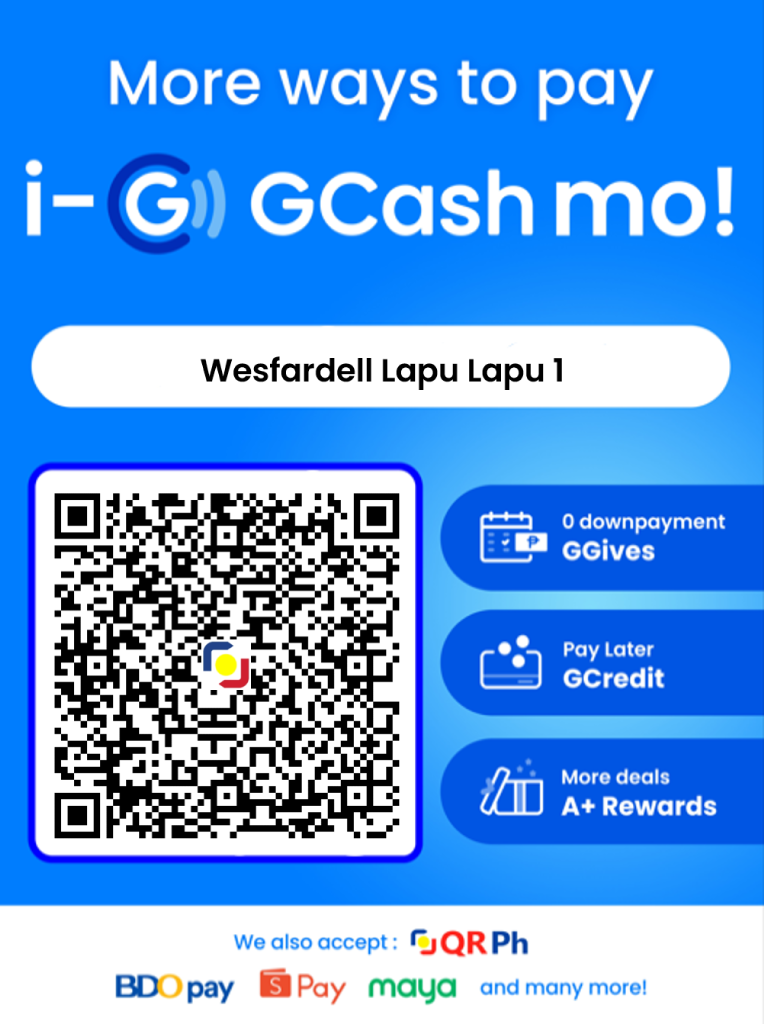
Please do not guess your balance. Confirm your exact amount due first by checking your latest billing SMS, or quickly ask our billing team on Messenger or phone (0949 885 0572).
• On PC / Another Phone: Open your GCash app, tap Scan QR, and point your camera at the QR code.
• On This Phone: Tap "Save QR to Photos" above. Next, open your GCash app, tap Scan QR → Upload from Gallery (Photos), pick the saved QR, and send the confirmed amount.
Take a screenshot of your successful GCash receipt and send it to our official Facebook Messenger along with your Account Number.
Send Receipt to Facebook Messenger (m.me/Wesfardell) →Payments are confirmed within 1 hour of sending your screenshot. If your line is currently restricted, connectivity will be restored within the hour.
Note on Invoices: After-hours payments are confirmed within the hour; official invoices are issued on the next working day.
Important Reminder: Do not forget to send the screenshot. Our team requires your receipt screenshot to match your account and confirm your payment.
Pay via Xendit Checkout
Pay using Credit/Debit Cards, Maya, Online Banking, or GCash via Xendit.
Because Xendit dispatches automated notifications directly to our system, your account will be reactivated within the hour with no screenshot required.
Pay GCash via Xendit: You can select GCash inside the Xendit checkout to pay directly from your GCash wallet and skip having to send a screenshot!
Wesfardell Connect Secure Checkout
Click the link below to go directly to our official Xendit payment link where you can enter your payment details and pay securely.
Direct URL: checkout.xendit.co/od/Wesfardell_Connect
Wesfardell Branches
Walk-in counters for postpaid bill payments and instant BIR Official Receipts (OR).
Main Office
1974 Lapu-Lapu Street, Roxas City, Capiz 5800
Monday to Saturday (Closed on Sundays)
Gaisano Grand Mall Branch
LG27 Lower Ground Floor, Gaisano Grand Mall, Arnaldo Boulevard, Roxas City
Monday to Sunday (Open daily including weekends & mall holidays)
Authorized Prepaid Reload Stores
Convenience cash reload spots for Prepaid FTTH subscribers in local subdivisions.